
\documentclass{desktop-app}
Overleaf's editing experience, running entirely on your own machine.
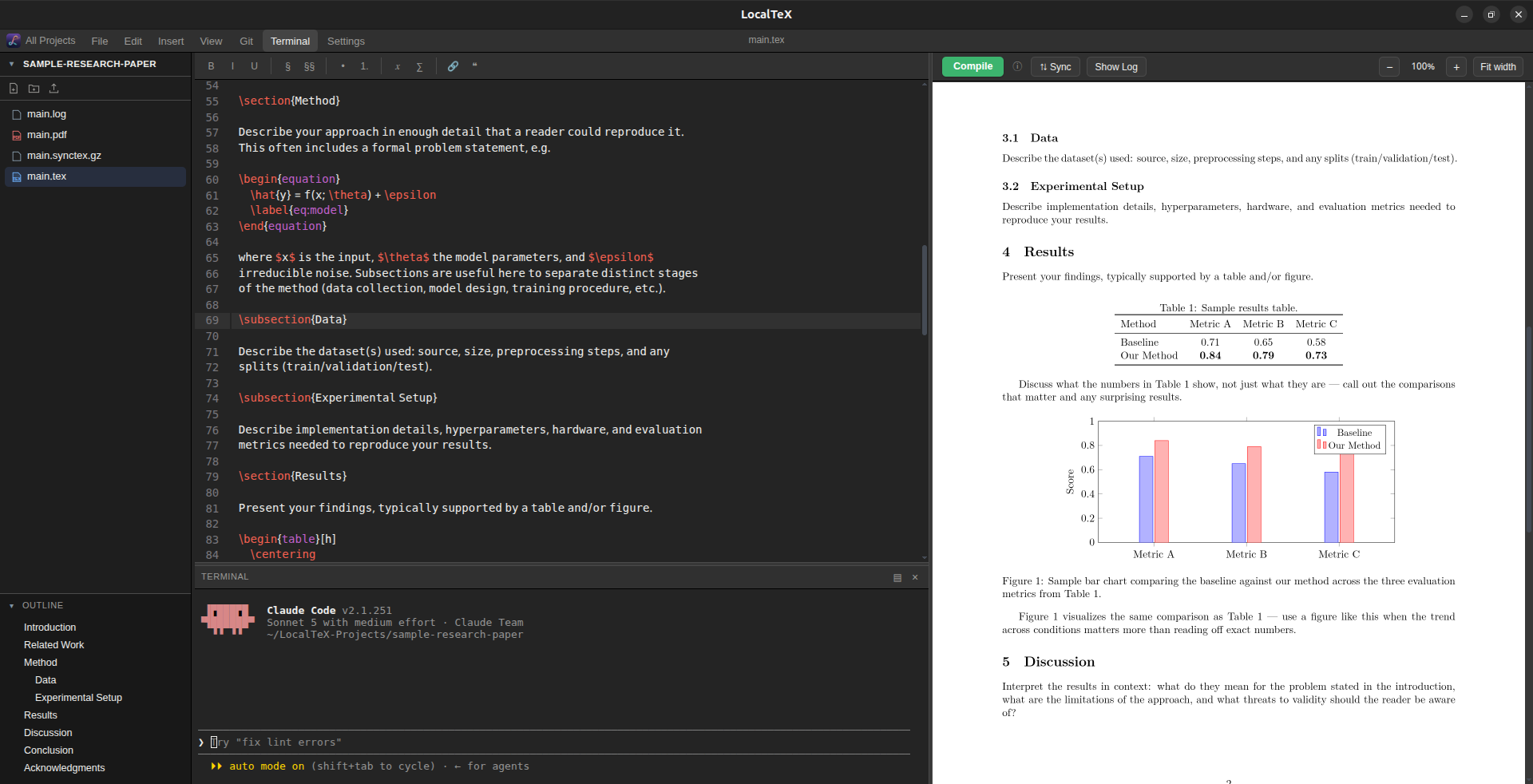
A live LaTeX editor, a real compiler, and a real terminal — one window, no cloud, no account, no multi-gigabyte TeX Live install.
Why LocalTeX
Overleaf is great until you need it offline, want your files to actually live on your computer, or just don't want to pay for faster compiling on your own laptop. LocalTeX gives you that same writing-and-preview experience, with nothing running outside your machine and no account required.
Every project lives on your computer as plain files — .tex, .bib, images, whatever your document needs — so you can back them up, move them, or open them in any other program you like. Nothing is silently uploaded anywhere.
Features
Ten things it actually does, no marketing filler.
Multi-project dashboard
An Overleaf-style home screen listing every project under ~/LocalTeX-Projects, with search, new/delete, and .zip export/import.
Live editor
LaTeX syntax highlighting, autosave, undo/redo, find/replace, a symbol toolbar, and a document outline that jumps you straight to any section.
Real compiler
Compiles your document with a self-contained LaTeX engine, so there's no multi-gigabyte TeX Live install to set up first. Errors show up right where they happened.
SyncTeX
Click "Sync" to jump the PDF to your cursor's position; double-click the PDF to jump the editor back — both directions, pixel-accurate.
Real terminal
A genuine terminal built in, not a fake console. Dock it to the bottom or side, and resize it however you like.
PDF preview
A crisp, high-resolution preview that updates as you compile. Foldable, resizable split view, plus zoom with Ctrl+scroll or a touchpad pinch.
Project-wide search
A VS Code-style search panel — find text across every file in a project, not just the open one.
File tree
Overleaf-style sidebar — create, rename, drag-and-drop move, and delete via right-click or empty-space click.
Themes
VS Code Dark, Dracula, GNOME, and Light — covers the editor, terminal, and app chrome.
Multilingual documents
A bundled Bengali font plus a XeLaTeX + polyglossia starter template for mixing non-Latin scripts with Latin text.
Install
Debian/Ubuntu-based Linux (apt-based), Windows 10/11, and macOS are supported.
-
Download and install the package
curl -fSLO https://github.com/sayedshaun/localtex/releases/latest/download/localtex.deb sudo apt install ./localtex.deb -
Install Tectonic
Needed on
PATHto actually compile documents:curl -fsSL https://drop-sh.fullyjustified.net | sh
Launch LocalTeX from your application menu, or run localtex from a terminal.
-
Download and run the installer
Grab
localtex-setup.exefrom Releases and run it. -
Install Tectonic
Needed on
PATHto actually compile documents — grab the Windows build from the Tectonic install page.
-
Download and install the app
Grab
localtex.dmgfrom Releases, open it, and drag LocalTeX into your Applications folder. -
Bypass Gatekeeper (first launch only)
The app isn't notarized with an Apple Developer certificate, so right-click it in Applications and choose Open instead of double-clicking — or clear the quarantine flag yourself:
xattr -cr /Applications/LocalTeX.app -
Install Tectonic
Needed on
PATHto actually compile documents:brew install tectonic
Uninstall
Linux
sudo apt remove localtexThis only removes the localtex package. It won't touch your ~/LocalTeX-Projects files or the standalone tectonic binary — remove those yourself if you no longer need them:
rm -rf ~/LocalTeX-Projects
rm -f ~/.local/bin/tectonic
Windows
Uninstall LocalTeX from Windows Settings → Apps, same as any other app. It won't touch your LocalTeX-Projects folder or your Tectonic install.
macOS
Drag LocalTeX from Applications to the Trash. It won't touch your ~/LocalTeX-Projects files or your Tectonic install — remove those yourself if you no longer need them:
rm -rf ~/LocalTeX-Projects
brew uninstall tectonic